Muskie Discussion Forums
| ||
| Random quote: If you fish where you always fish,you will catch what you always catch.Dick Pearson - (Added by: FishingFool) |
| Moderators: Slamr | View previous thread :: View next thread |
| Jump to page : 1 Now viewing page 1 [30 messages per page] More Muskie Fishing -> Basement Baits and Custom Lure Painting -> Redwood Pre-Etex Just trying a new sizing system |
| Message Subject: Redwood Pre-Etex Just trying a new sizing system | |||
Beaver |
| ||
Posts: 4266 | Here goes nothing..... I quit, I installed Adobe 10 and actually shrunk the size of the image to the size of a postage stamp and it was still too big. Edited by Beaver 11/15/2014 7:23 PM | ||
| Beaver |
| ||
Posts: 4266 | And once again | ||
| Trophyseeker50 |
| ||
Posts: 791 Location: WI | Send it to me and I will post | ||
| Dog Lake |
| ||
Posts: 38 | Hear you go Beav. Attachments ----------------  BeavRedwood.jpg (18KB - 190 downloads) BeavRedwood.jpg (18KB - 190 downloads) | ||
| Beaver |
| ||
Posts: 4266 | I'm not quitting until I do it. And how the hell do I get it from paint to here? Takes it right down to size, how do I save it and select it instead of getting..."No file by that name"? Edited by Beaver 11/15/2014 8:37 PM Attachments ---------------- DSC_0360_edited-1.JPG (92KB - 199 downloads) | ||
| Beaver |
| ||
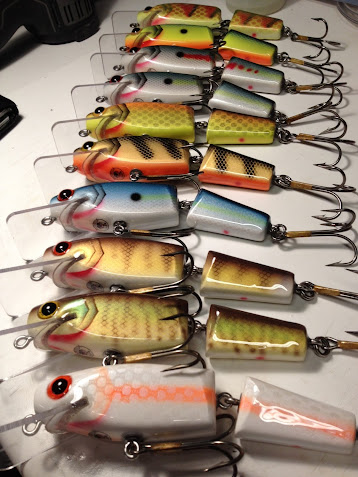
Posts: 4266 | Upload successful after making 12 changes to the size before I could get it under 100! The second last try was 100 on the head, but it had to be under 100. Definitely not for group shots because the quality that you try to achieve gets lost in the resizing. I miss my old POSOS that was set to automatically resize any picture coming here to 425x225 pixels after I did all of my hocus pocus.. Anyway, those are the 12" trolling lures made from reclaimed Redwood. And for those of you who asked for historical clarification and Certificates of Authenticity, my lumber man suggests you wait for the next batch....cuz there isn't going to be one. | ||
| sworrall |
| ||
Posts: 32979 Location: Rhinelander, Wisconsin | Use the photo resizing program on the machine. Or, If you use Paint, do this: Right click on the original image Click 'open with' and select Paint Open the image in paint click on 'resize' select 'pixels' enter 640 in the top box, bottom will display automatically. Go to upper left and select 'save as' and name the photo Save to desktop, and your original will remain unchanged Also, check what you camera settings and file type are and make sure you are using .jpeg. | ||
| Trophyseeker50 |
| ||
Posts: 791 Location: WI | I like every pattern there! Very nice | ||
| Beaver |
| ||
Posts: 4266 | I sold all of the Giants and a handfull of 10" lures that I made (like the one in the center), today I clear coated all of the Naturals that I made and then I get to enjoy a whole month with my daughter and put all of the lures on hold. I still have 50- 7 & 8" crankbaits made but not painted from the reclaimed Redwood, so maybe I'll have a bunch ready for the Milwaukee swap. The guy from the mill sent me a Christmas present cut from the last of the silver mine wood scraps. It's all different sizes, but I'll be able to make a bunch of Giants again for next fall. This time I'm starting that project lots sooner. | ||
| ShutUpNFish |
| ||
 Posts: 1202 Location: Money, PA | They look great Beaver! Love the grain in the bare wood ones! I don't know why this day and age posting pics has to be such a chore...I think something should be updated with that on this site...Yeah, I can do it, but I'm decent with computers; however I have to say that its is a PIA when it really does not need to be. Can't something be done to make it easier?? | ||
| woodieb8 |
| ||
Posts: 1530 | sweet beaver. as for loading pictures,thats why my baits aren't up here. I cant put pictures up either. I am a b8 builder not a computer wiz. | ||


| Jump to page : 1 Now viewing page 1 [30 messages per page] |
| Search this forum Printer friendly version E-mail a link to this thread |


Copyright © 2026 OutdoorsFIRST Media |